On this page
Install and open AII OS
Version notes: v0.1.20 source · v0.1.19 downloads
These guides describe the public v0.1.20 source tag. The latest downloadable release checked on 19 October 2026 is v0.1.19. Check your installed version and its release notes before following configuration or recovery instructions. These procedures have not been runtime-tested.
Goal: reach the local dashboard. Opening the application is not yet authorizing its founding model conversation.
Choose the release asset, not source code. 2Install → launchUse the installed application.
The browser opens the dashboard. 3Recognise the stateExisting identity? Continue.
New or recovering? Choose deliberately. 4Start a conversationCheck destination and cost first.
Birth is a separate, consequential action.
You need an account on the computer, a browser, network access for initial platform material, and a deliberate choice of model destination. Running a local model also requires a separately installed compatible model server; AII OS's desktop download is not a model download. No universal RAM or GPU requirement has been verified.
Step 1: Choose the download
Open the latest release. Read its release notes and use an asset for your OS and processor, not GitHub's automatically generated source archive.
| Computer | Desktop route | Important boundary |
|---|---|---|
| Apple-silicon Mac | AII-OS-<version>.dmg |
arm64, declares macOS 13.0 minimum (packaging declaration, not a replayed test). No Intel-Mac desktop asset was listed. |
| Ubuntu/Debian-style Linux, x86-64 or arm64 | aii-os_<version>_amd64.deb or _arm64.deb |
Match your architecture. Other distributions are not established by the presence of a tar archive. |
| Windows x86-64 | aii-setup-<version>-amd64.exe |
Installs per-user under Local AppData, adds a Start Menu shortcut and launches AII OS. An error can occur after files were installed. |
<version> is a filename placeholder, not something to type literally. A matching checksum can detect an unexpected file difference; a checksum fetched from the same compromised source would not independently establish publisher authenticity.
If the release offers different assets, or your computer matches no route above, stop and check support rather than substituting a similarly named archive. Do not bypass operating-system security warnings.
Step 2: Install, then launch
- macOS: open the disk image and copy AII OS.app to Applications, the destination linked in the image. Launch the installed application. Do not use the mounted image as a permanent installation.
- Linux: open the architecture-matched
.debwith your distribution's package installer, review its changes and authorize installation if appropriate. Launch AII OS from the applications menu. Exact package-manager dialogs and system prerequisites need platform testing; no shell install command is assumed here. - Windows: run the setup executable after reviewing the publisher/security information. The installer writes program files, creates the AII OS Start Menu entry and starts the launcher. Use that entry for later launches. An existing installation can have its own processes stopped by the installer, so treat a reinstall as an operational change, not a harmless diagnostic.
On macOS/Linux the launcher can create an empty identity slot and register/start a background service. The Windows path also initializes a first slot when needed. Both aim to open a loopback dashboard in a browser. A browser tab and the background identity service are not the same process; closing the tab is not a documented stop procedure.
Expected checkpoint: the dashboard connects either to an existing identity or to No identity lives here yet. Do not select a fixed port from a figure: slots and configured ports can differ. Do not expose the dashboard publicly to fix a local launch problem.
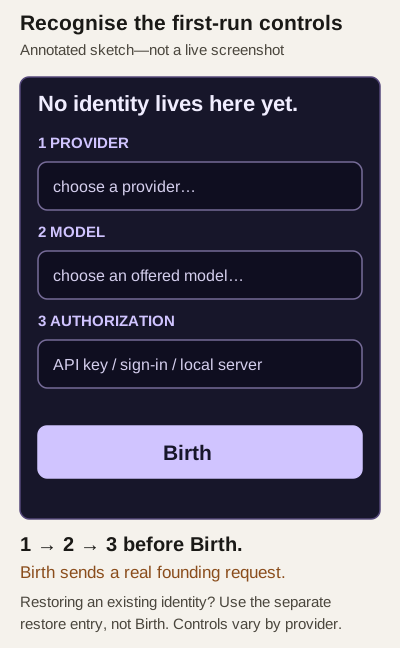
Annotated control sketch — source-derived, not a live application screenshot. Follow the adjacent steps and provider-specific prompts.
Step 3: Choose the correct next action
- Existing identity: do not click Birth to match this guide. Continue to your first ordinary message.
- New identity deliberately wanted: continue to setup and first conversation.
- Recovering an identity: use backup and restore guidance, not Birth.
- No dashboard or an error: use setup and delivery triage. Preserve the error text, OS and app version before retrying; do not delete an identity directory or take over an unfamiliar port.
Still needed: installer execution, operating-system permission prompts and verified service stop/restart behaviour on each supported platform. No installer screen or first launch has been captured from a running installation.
Implementation evidence
- packaging/macos/build-dmg.sh
- packaging/macos/build-dmg.sh
- cmd/aii-setup/main_windows.go
- cmd/aii-app/main.go
- cmd/aii-app/main_windows.go
- packaging/deb/aii-os.desktop